
Updated 17 November 2026 · Written by the Digital Calculators team
Key takeaways
- Binary code uses only two digits, 0 and 1. Each digit is a bit; 8 bits make a byte.
- Place values double from right to left: 1, 2, 4, 8, 16, 32, 64, 128. Add the values under each 1.
- Letters are stored as numbers. Capital A is 65, which is 01000001; lowercase a is 97, 01100001.
- In UTF-8, the encoding used for most text today, the basic English letters, digits and symbols use one byte each, with the same values as ASCII.
- Accented letters and emoji take two to four bytes in UTF-8.
Binary code is the way computers store numbers, text and everything else: as long strings of 0s and 1s. Each 0 or 1 is a bit, and a group of eight bits is a byte. A byte can stand for a number from 0 to 255, and with an agreed code, a letter: in the standard encodings used on the web, 01000001 means capital A.
This guide shows how to read binary with place values, how to convert numbers to and from binary by hand, and gives a full binary alphabet for upper and lowercase letters, digits and common symbols. It also explains how UTF-8, defined in the internet standard RFC 3629, stores letters and emoji as bytes. The binary translator below converts any text to binary and back.
- How binary numbers work
- Why computers use binary
- How to convert decimal to binary
- Binary alphabet: A to Z
- Binary for numbers and symbols
- Reading and writing words in binary
- Beyond English: UTF-8 bytes
- Adding numbers in binary
- Practice: test yourself
- Bits, bytes and common mistakes
- Frequently asked questions
- Sources
How binary numbers work
Our everyday numbers are base 10: each place is worth ten times the one to its right (ones, tens, hundreds). Binary is base 2: each place is worth twice the one to its right.
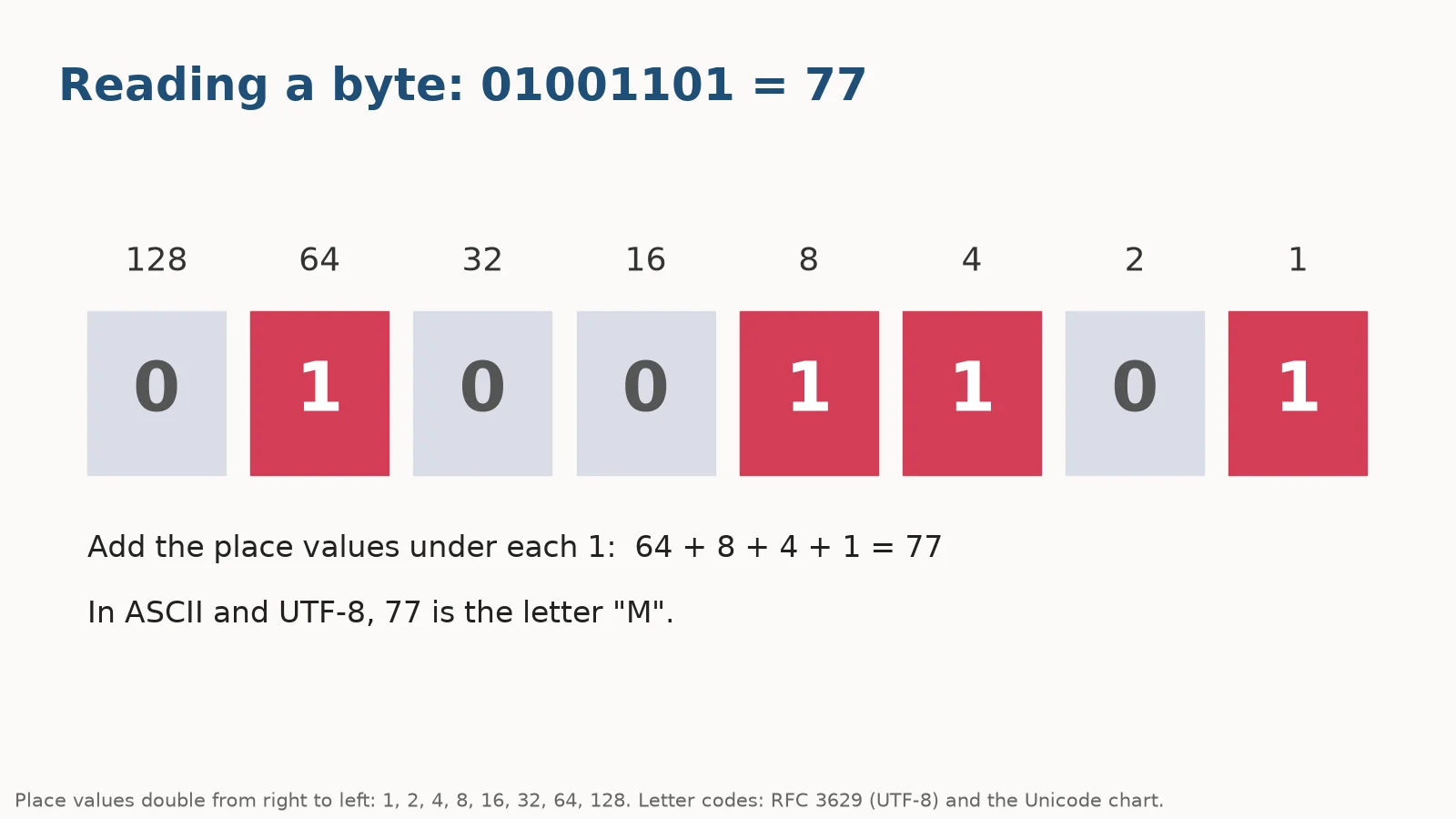
| Place value | 128 | 64 | 32 | 16 | 8 | 4 | 2 | 1 |
|---|---|---|---|---|---|---|---|---|
| Bits of 77 | 0 | 1 | 0 | 0 | 1 | 1 | 0 | 1 |
To read a binary number, add the place values wherever there is a 1. For 01001101: 64 + 8 + 4 + 1 = 77.
With 8 bits the smallest number is 00000000 (0) and the largest is 11111111, which is 128 + 64 + 32 + 16 + 8 + 4 + 2 + 1 = 255. So one byte can hold 256 different values.
Counting in binary
| Decimal | Binary | Binary (4 bits) | Hex |
|---|---|---|---|
| 0 | 0 | 0000 | 0 |
| 1 | 1 | 0001 | 1 |
| 2 | 10 | 0010 | 2 |
| 3 | 11 | 0011 | 3 |
| 4 | 100 | 0100 | 4 |
| 5 | 101 | 0101 | 5 |
| 6 | 110 | 0110 | 6 |
| 7 | 111 | 0111 | 7 |
| 8 | 1000 | 1000 | 8 |
| 9 | 1001 | 1001 | 9 |
| 10 | 1010 | 1010 | A |
| 11 | 1011 | 1011 | B |
| 12 | 1100 | 1100 | C |
| 13 | 1101 | 1101 | D |
| 14 | 1110 | 1110 | E |
| 15 | 1111 | 1111 | F |
| 16 | 10000 | 10000 | 10 |
Each group of 4 bits matches exactly one hexadecimal digit, which is why programmers often write binary values in hex. Our guide to hex color codes uses the same idea.
Why computers use binary
Computer hardware is built from components that are easiest to make reliable when they only need to tell two states apart, such as a voltage being high or low, or a tiny switch being on or off. Two states map neatly onto the two binary digits, 1 and 0.
Everything else is built on top of that. Numbers are stored with place values, as above. Text is stored by giving each character a number. Colors are stored as numbers for red, green and blue. Sound and images are stored as long lists of measured values. In every case, the computer only ever holds bits; the meaning comes from the agreed code used to read them.
That is why the same byte, 01000001, can be the number 65, the letter A, or part of a color, depending on what the program expects.
How to convert decimal to binary
Divide by 2 again and again, writing down the remainders. Then read the remainders from bottom to top. For 77:
| Division | Result | Remainder |
|---|---|---|
| 77 ÷ 2 | 38 | 1 |
| 38 ÷ 2 | 19 | 0 |
| 19 ÷ 2 | 9 | 1 |
| 9 ÷ 2 | 4 | 1 |
| 4 ÷ 2 | 2 | 0 |
| 2 ÷ 2 | 1 | 0 |
| 1 ÷ 2 | 0 | 1 |
Reading the remainders upward gives 1001101. Padded to 8 bits, that is 01001101.
A second method is to subtract the largest place value that fits: 77 − 64 = 13, 13 − 8 = 5, 5 − 4 = 1, 1 − 1 = 0. Put a 1 under 64, 8, 4 and 1, and 0 everywhere else. The binary calculator converts and does arithmetic in binary.
Prefer a full page? Open the Binary Translator.
Binary alphabet: A to Z
Text is stored by giving every character a number and storing the number in binary. RFC 3629 explains that UTF-8, the encoding used for most web pages, keeps the US-ASCII values for the characters U+0000 to U+007F, each stored in a single byte. So the basic English alphabet has these codes:
| Upper | Decimal | Binary | Lower | Decimal | Binary |
|---|---|---|---|---|---|
| A | 65 | 01000001 | a | 97 | 01100001 |
| B | 66 | 01000010 | b | 98 | 01100010 |
| C | 67 | 01000011 | c | 99 | 01100011 |
| D | 68 | 01000100 | d | 100 | 01100100 |
| E | 69 | 01000101 | e | 101 | 01100101 |
| F | 70 | 01000110 | f | 102 | 01100110 |
| G | 71 | 01000111 | g | 103 | 01100111 |
| H | 72 | 01001000 | h | 104 | 01101000 |
| I | 73 | 01001001 | i | 105 | 01101001 |
| J | 74 | 01001010 | j | 106 | 01101010 |
| K | 75 | 01001011 | k | 107 | 01101011 |
| L | 76 | 01001100 | l | 108 | 01101100 |
| M | 77 | 01001101 | m | 109 | 01101101 |
| N | 78 | 01001110 | n | 110 | 01101110 |
| O | 79 | 01001111 | o | 111 | 01101111 |
| P | 80 | 01010000 | p | 112 | 01110000 |
| Q | 81 | 01010001 | q | 113 | 01110001 |
| R | 82 | 01010010 | r | 114 | 01110010 |
| S | 83 | 01010011 | s | 115 | 01110011 |
| T | 84 | 01010100 | t | 116 | 01110100 |
| U | 85 | 01010101 | u | 117 | 01110101 |
| V | 86 | 01010110 | v | 118 | 01110110 |
| W | 87 | 01010111 | w | 119 | 01110111 |
| X | 88 | 01011000 | x | 120 | 01111000 |
| Y | 89 | 01011001 | y | 121 | 01111001 |
| Z | 90 | 01011010 | z | 122 | 01111010 |
Two patterns make the table easy to remember:
- Capitals start with 010, and the last five bits count the letter’s position: A is 00001 (1), B is 00010 (2), up to Z, 11010 (26).
- Lowercase starts with 011. The only difference from the capital is one bit, worth 32: a (97) = A (65) + 32.
Binary for numbers and symbols
The digits 0 to 9 as text characters (not as numbers) are:
| Character | Decimal code | Binary |
|---|---|---|
| 0 | 48 | 00110000 |
| 1 | 49 | 00110001 |
| 2 | 50 | 00110010 |
| 3 | 51 | 00110011 |
| 4 | 52 | 00110100 |
| 5 | 53 | 00110101 |
| 6 | 54 | 00110110 |
| 7 | 55 | 00110111 |
| 8 | 56 | 00111000 |
| 9 | 57 | 00111001 |
Notice that the character “7” is stored as 55, not 7. The last four bits of each digit character are the digit itself in binary: “7” ends in 0111.
Some common symbols:
| Character | Decimal code | Binary |
|---|---|---|
| Space | 32 | 00100000 |
| ! | 33 | 00100001 |
| ? | 63 | 00111111 |
| . | 46 | 00101110 |
| , | 44 | 00101100 |
| @ | 64 | 01000000 |
Reading and writing words in binary
Text to binary
Write each character’s code as 8 bits. “Hi!” becomes:
01001000 01101001 00100001
That is H (72), i (105) and ! (33).
Binary to text
Split the bits into groups of 8, turn each group into a number, then look up the letter. For 01000011 01100001 01110100:
- 01000011 = 64 + 2 + 1 = 67 = C
- 01100001 = 64 + 32 + 1 = 97 = a
- 01110100 = 64 + 32 + 16 + 4 = 116 = t
The message is “Cat“. If the bits are not split into bytes, count off 8 at a time from the left.
Beyond English: UTF-8 bytes
Characters outside the basic Latin set, such as accented letters, other alphabets and emoji, have code points above 127. RFC 3629 sets out how UTF-8 stores them in more than one byte, using fixed starting bits so a computer can tell where each character begins:
- U+0000 to U+007F: one byte,
0xxxxxxx - U+0080 to U+07FF: two bytes,
110xxxxx 10xxxxxx - U+0800 to U+FFFF: three bytes,
1110xxxx 10xxxxxx 10xxxxxx - U+10000 to U+10FFFF: four bytes,
11110xxx 10xxxxxx 10xxxxxx 10xxxxxx
| Character | Code point | Bytes | UTF-8 in binary |
|---|---|---|---|
| A | U+0041 | 1 | 01000001 |
| é (e with acute) | U+00E9 | 2 | 11000011 10101001 |
| € (euro sign) | U+20AC | 3 | 11100010 10000010 10101100 |
| 😀 (emoji) | U+1F600 | 4 | 11110000 10011111 10011000 10000000 |
This is why a text with accents or emoji takes more bytes than its character count suggests, and why the character counter may show different numbers for characters and bytes.
Adding numbers in binary
Binary addition works like ordinary addition, column by column from the right, with only four rules:
- 0 + 0 = 0
- 0 + 1 = 1
- 1 + 1 = 10 (write 0, carry 1)
- 1 + 1 + 1 = 11 (write 1, carry 1)
Example: 01101 (13) + 00111 (7) = 10100 (20). Working from the right: 1 + 1 = 0 carry 1; 0 + 1 + 1 = 0 carry 1; 1 + 1 + 1 = 1 carry 1; 1 + 0 + 1 = 0 carry 1; 0 + 0 + 1 = 1.
Computers do all their arithmetic this way, with circuits that follow exactly these rules. The binary calculator adds, subtracts, multiplies and divides binary numbers and shows the decimal result.
Practice: test yourself
| Question | Answer |
|---|---|
| Read 00011001 | 25 |
| Read 10000000 | 128 |
| Write 42 in 8 bits | 00101010 |
| Write 200 in 8 bits | 11001000 |
| Decode 01001111 01001011 | OK |
| Encode “Yes” | 01011001 01100101 01110011 |
Use the place values 128, 64, 32, 16, 8, 4, 2, 1 for the first four, and the alphabet table for the last two. Check your work with the translator above.
Bits, bytes and common mistakes
- Bit vs byte: a bit is one binary digit; a byte is 8 bits. A file size in bytes times 8 gives bits.
- Reading the wrong way: the rightmost bit is worth 1, not 128.
- Dropping leading zeros: A is 1000001 in plain binary, but as a byte it is 01000001. Translators expect full 8-bit groups.
- Mixing up “7” and 7: the character 7 is 00110111 (55), while the number 7 is 00000111.
- Assuming one byte per character: true only for the basic set. In UTF-8, é takes 2 bytes and many emoji take 4.
For other codes, see our guides to the Morse code alphabet and Roman numerals, or try the Caesar cipher.
Frequently asked questions
What is binary code?
A way of representing numbers, text and other data using only the digits 0 and 1.
What is A in binary?
Capital A is 65, which is 01000001. Lowercase a is 97, which is 01100001.
How do I read binary?
Write the place values 128, 64, 32, 16, 8, 4, 2, 1 above the bits and add the values wherever there is a 1.
How many bits are in a byte?
8 bits. One byte can hold 256 values, from 0 to 255.
How do I convert a number to binary?
Divide by 2 repeatedly and read the remainders from bottom to top, or subtract the largest place value that fits.
What is 255 in binary?
11111111, the largest value in one byte.
Is binary the same as ASCII?
No. Binary is a number system; ASCII is a code that assigns numbers to characters. In UTF-8, those ASCII numbers are stored as single bytes.
How is an emoji stored in binary?
In UTF-8, most emoji take 4 bytes (32 bits), using the four-byte pattern set out in RFC 3629.
Related calculators
Sources
- RFC 3629: UTF-8, a transformation format of ISO 10646, Internet Engineering Task Force (IETF). UTF-8 byte patterns, and that U+0000 to U+007F are stored as single bytes with their US-ASCII values.
- C0 Controls and Basic Latin code chart (U+0000 to U+007F), The Unicode Consortium. Code points for the basic Latin letters, digits and symbols.